
If you have completed the Internet Setup of QuikStor Express then you have the ability to email receipts to tenants who have an email address on file. There are two ways to do this.
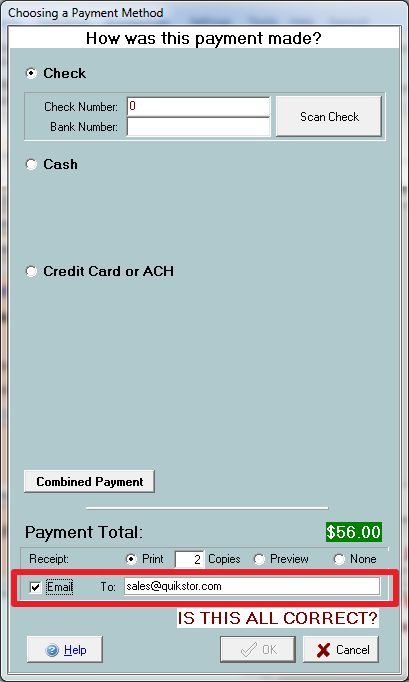
1. In Person Payment – In the make a payment window, when you chose how a payment was made, you will have the ability to enter in an email address where the tenant would like the receipt for this payment sent to. If the tenant already has an email address on file, that email address will appear in this field by default. Simply check the “Email” check box and verify the tenant’s email address. This will email a receipt for any type of payment that you make.
When you are done it will place a copy of the email in your QuikStor Outbox (or Outlook if you have the Outlook Integration module) to be processed automatically during the overnights (if applicable), or for you to manually send.
2. Automatic Billing Receipt
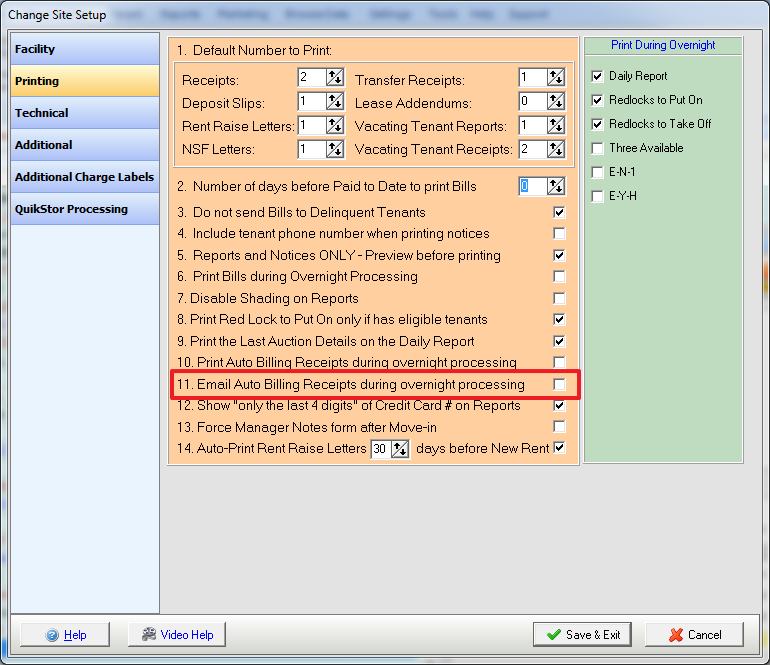
In Change Site Setup -> Printing, Option #11 gives you the ability to choose whether or not tenants who are on auto-billing should receive a receipt. To enable this setting, so that all tenants who are on auto-billing AND have a valid email address will receive an email copy of their receipt, ensure that box #11 in the printing section of Change Site Setup is checked.
For tenants making in person payments you can choose to have the system ALWAYS email a receipt automatically when the tenant has an email address on file. This is done through destination options. Visit this knowledge base article for more information: Destination Options