
Refunds within QuikStor Express are usually given during a Move Out. To refund from Express, first perform a Move-Out for a tenant by selecting the tenant, going to the Move-In/Out menu, and selecting Move-Out. From this screen click Next, and then you will get a window that has a section on it similar to this.
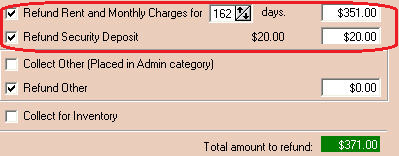
From this screen (as noted above) check how much you want to refund this tenant that is moving out, and then complete the remainder of the Move-Out.
The only other time that Express will allow you to give a refund is if a tenant that is paid ahead and has purchased insurance decides to cancel his insurance. At that point, Express will ask if you want to refund the advance payment.
Now that you have made a refund, you are probably wondering what reports will show it.
Most of the reports in Express only show Collections (money taken in from renting units, inventory or miscellaneous charges). This is why a Bank Deposit and a Daily Collection Report do not show when refunds are made – both of these reports are for Collections only.
The report that shows refunds is the “Report On All The Refunds (R-E-F)” which can be found by going to Reports -> Exceptions -> Report On All The Refunds or by searching for R-E-F in the Report Selector module. You will be able to enter a date range for this report, so you can see all of the refunds that were made for a given date range.