
In certain cases at your site, you may need to Pro Rate or Charge a different amount upon a tenant vacating.
Start out by selecting the tenant you wish to work with, and going to the Move-In/Out menu on the toolbar, and selecting Move-Out.
The first screen it that comes up shows you a small breakdown of the tenant information, and some of the vacating information (to learn more about Move Outs go to the Section of the QSX Manual that deals with Move Outs). Click Next on this screen. The next screen that you will see looks like this:
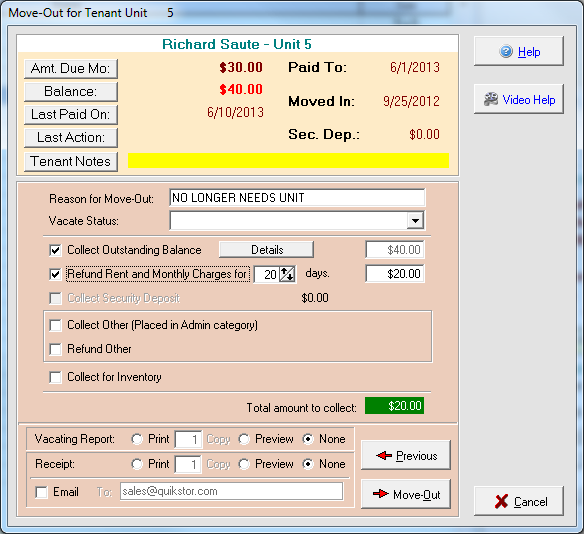
On this screen as you can see there is a place for you to Collect Outstanding Balance, and Refund Rent and Monthly Charges for a certain amount of days. What you want to do is make sure that the Collect Outstanding balance is checked. The amount should be the amount of days from today’s date, up until the tenant’s next paid to date. Remember that Express works on a 30 day month, no matter how long the calendar thinks the month is.
Now if you want to Pro Rate or charge the vacating tenant any different amount than the full outstanding balance, you would use one of the two methods below:
- The first way is if you do a Pro rate, or know the certain amount of days, that you don’t want to charge the vacating tenant for. First put a checkmark in this box:
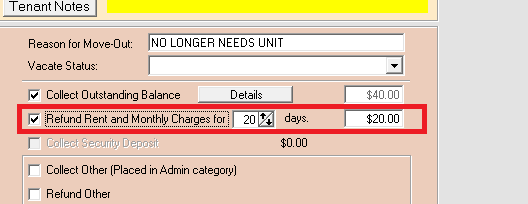
Then scroll through and set the number of days you would like to take off of the Outstanding Balance for the tenant to pay. For example, If a tenant’s paid to date is the first, and he comes in on the first to move out, and you want to charge him for 15 days, you would simply follow the directions above, and where you put in the amount of days, you would put 15, and then it would total it all up for you.
- The second way is if you have a completely different amount that you would like to charge the vacating tenant. First uncheck the Collect Outstanding Balance field, and go to this area:
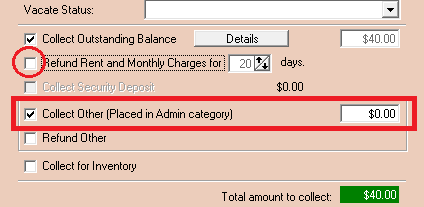
Put a check mark in the box, and then type in the amount that you wish the tenant to pay upon Move out.
Once you are finished with this click on the Move-Out button and finish the Move-Out as normal.