
This feature allows you to Un-Reserve a unit that currently has a reservation
Start off by selecting a reserved unit from your unit list. Next go to the Move-In/Out menu on your main toolbar and select Un-Reserve Unit.
You will get a Warning box asking if you really want to Un-Reserve the selected unit. Take this time to double check that this is the correct unit you wish to Un-Reserve, and then click on the Yes button to continue, or the No button to go back to the main screen of Express.
Once you click the Yes button, if there was any money paid towards the original reservation, you will get a window similar to this.
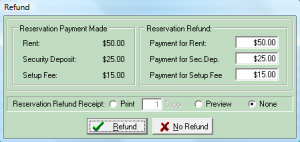
If this information is accurate and you wish to refund the amount indicated, click on the Refund button to finish or if you do not wish to give this person a refund click on the No Refund button to finish this without refunding money.
After this is done you may get a window asking if you wish to return this person to the Waiting List. Click the Yes button to do so, or No to go back to the main screen without adding them to the Waiting List.